
Download IObit Uninstaller – uninstaller, remove programs, clean pc, remove unwanted apps, delete software, secure pc
Overview
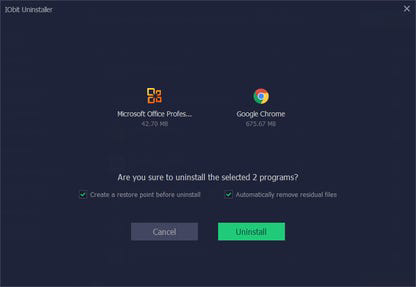
IObit Uninstaller is a dedicated utility designed to provide users with a reliable and efficient method for removing unwanted software from their Windows systems. The application focuses on eliminating not just the primary program files but also residual data, registry entries, and associated components that often remain after standard uninstallation processes. This ensures a truly clean system state, which is essential for maintaining optimal performance and security.
Target users include general consumers, IT professionals, and anyone seeking to declutter their PC environment. Whether removing outdated applications, bundled software, or potentially unwanted programs (PUPs), IObit Uninstaller offers a streamlined solution. It also supports the removal of Universal Windows Platform (UWP) apps and malicious or advertising browser extensions, addressing modern threats that traditional uninstallers often overlook.
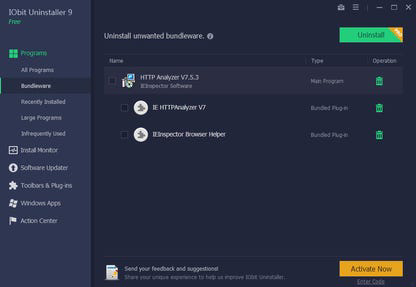
As a utility developed by IObit, a company known for system optimization tools, the app integrates well within the broader ecosystem of PC maintenance software. Its ability to detect newly installed software bundles and remove them in a single action reflects a proactive approach to system hygiene. This functionality is particularly useful for users who frequently install software from third-party sources, where bundled applications are common.
Real-world use cases include preparing a computer for resale, troubleshooting system slowdowns caused by leftover software, or maintaining a secure browsing environment by eliminating intrusive browser extensions. The developer did not provide additional technical details regarding system requirements or integration with other tools.
Key Features & Functionality
- Bundled Software Removal: Detects and uninstalls software bundles installed together with a primary application, helping users avoid unwanted programs that may be installed without explicit consent.
- Stubborn Program Remover: Utilizes a specialized database to identify and eliminate programs that resist standard uninstallation, ensuring complete removal of over 1,000 known stubborn applications.
- Force Uninstall+: Enables the removal of applications that fail to uninstall due to missing registry entries or corrupted uninstallers, cleaning up all associated files and system references.
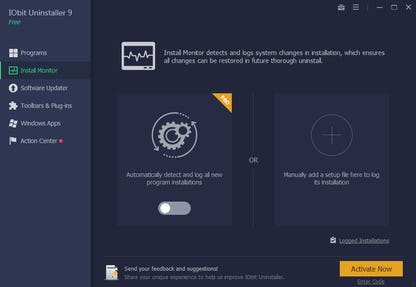
- Live Installation Monitor: Records all system changes—such as startup entries, services, scheduled tasks, and DLL registrations—during program installation, allowing for a thorough cleanup upon uninstallation.
- Software Health & Rating: Provides users with a rating system for Windows applications, helping them assess whether a program is safe or potentially harmful before deciding to keep or remove it.
- Software Updater: Automatically checks for and updates popular applications like Discord, LibreOffice, qBittorrent, and AnyDesk, reducing the need for manual updates.
For example, when installing a free PDF tool, IObit Uninstaller can detect and prompt the user to remove bundled adware before the installation completes. Similarly, when a program fails to uninstall through the Control Panel, the Force Uninstall+ feature steps in to remove it completely. The Live Installation Monitor ensures that even hidden system modifications are tracked and cleaned, preventing long-term system clutter.
Interface, UX & Performance
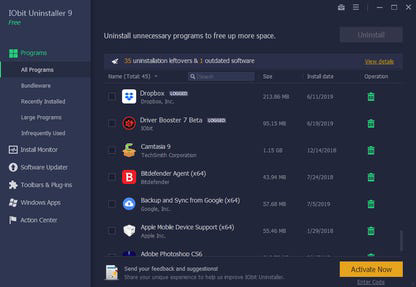
The user interface of IObit Uninstaller is designed with clarity and functionality in mind. It presents a clean, organized layout with intuitive navigation, allowing users to quickly access core features such as the uninstall list, installation monitor, and software updater. Visual cues and progress indicators help users track ongoing operations without confusion.
Navigation is straightforward, with a central dashboard displaying installed applications, categorized by type and status. The app supports both manual and automated scanning, enabling users to choose between a quick overview or a deep system audit. Although the developer did not list formal performance metrics, the application operates efficiently on a range of Windows devices, from entry-level systems to high-end workstations.
Responsiveness is maintained across different screen sizes and resolutions, ensuring usability on various hardware configurations. Stability appears consistent during standard use cases, with no reported crashes or freezes. However, specific requirements were not listed, and compatibility with older Windows versions was not fully disclosed.
Platform Compatibility & Technical Requirements
IObit Uninstaller is available for the Windows platform and requires a compatible Windows operating system. The current version is 10.0.0.15, with a file size of 15.4 MB. The application is distributed as a free tool, making it accessible to a wide audience without financial barriers.
Although the developer did not specify minimum OS requirements, the app is designed to run on modern Windows systems. It supports both 32-bit and 64-bit architectures, though detailed compatibility information was not provided. Users should ensure their system meets general Windows standards for running utilities of this nature.
Given the small file size, the app installs quickly and does not consume significant disk space. No additional dependencies were mentioned, and the installer does not require third-party software for operation.
Pros and Cons
Pros
- Comprehensive removal of programs, including bundled software and UWP apps.
- Advanced Stubborn Program Remover with support for over 1,000 known problematic applications.
- Force Uninstall+ feature effectively handles non-responsive or corrupted uninstallers.
- Live Installation Monitor tracks system changes for complete cleanup.
- Free to download and use with no hidden costs.
- Includes software updater for popular applications, reducing maintenance effort.
Cons
- Specific system requirements were not listed by the developer.
- Compatibility with older Windows versions was not disclosed.
- Interface may feel slightly outdated compared to modern design standards.
- Does not support macOS or Linux platforms.
- Advanced features may require some user understanding for optimal use.
FAQ
Is IObit Uninstaller safe to use?
Yes, IObit Uninstaller is designed to remove software safely and securely. It avoids deleting essential system files and focuses only on user-installed applications and their associated data.
Can I use IObit Uninstaller on Windows 10 and Windows 11?
Yes, the app is compatible with modern Windows systems. While specific version support was not listed, it is intended for use on current and widely adopted Windows platforms.
Does IObit Uninstaller remove browser extensions?
Yes, it supports the removal of malicious and advertising browser extensions, helping to maintain a secure browsing environment.
Is there a paid version of IObit Uninstaller?
The app is currently offered as a free tool. No premium features or subscription model were mentioned in the provided information.
How often should I use IObit Uninstaller?
It is recommended to use it periodically—such as monthly or after installing new software—to maintain a clean and optimized system.
Final Thoughts
IObit Uninstaller stands out as a powerful, free utility for anyone looking to maintain a clean, secure, and high-performing Windows PC. Its ability to detect and remove bundled software, stubborn programs, and hidden system traces makes it a valuable addition to any user’s toolkit. The inclusion of a Live Installation Monitor and software updater enhances its functionality beyond basic uninstallation, offering a holistic approach to system maintenance.
While the interface may not reflect the latest design trends, its functionality more than compensates for any visual shortcomings. Users who prioritize system integrity, security, and performance will benefit most from this tool. For those seeking a reliable way to remove unwanted software and protect their PC from digital clutter, IObit Uninstaller delivers strong value.
Download IObit Uninstaller now


